The most striking feature of Moset Tree is that, it is used on JED itself to create the listing directory. It has been built with customizability in mind. You can have text fields, checkboxes, radio buttons, drop downs or many other field types in your listing submission form.
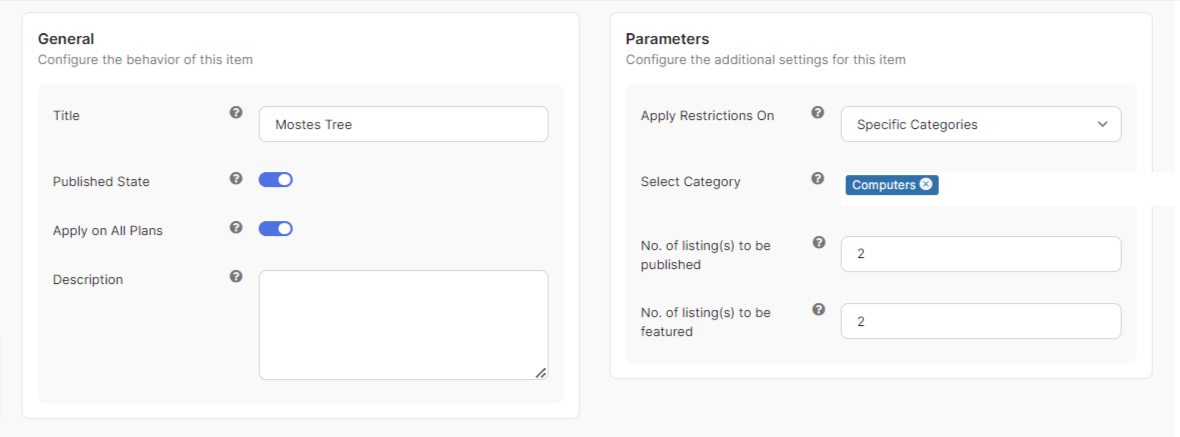
Mosets Tree app provide the functionality to limits the number of submissions of total listing, featured listing, and category listing based on plans.
Mosets Tree Apps Configuration
Navigate to and create a new instance of this app at
PayPlans > Apps > New > Phoca Download.Assign this instance to all plans using the Apply on All Plans setting or select specific plan if you want assign this instance to specific plan only.
The app will not take effect on plans that are not selectedMosets Tree app specific parameters in Parameter section as described below:
Apply Restrictions On : Determines restrictions rule to be applied on selected category or all categories.
No. of listing(s) to be published : Number of listing(s) user can submit and those submitted listings will be published automatically when subscription activates
No. of listing(s) to be featured : Number of listing(s) user can submit and those submitted listings will be automatically marked as featured randomly,when subscription activates.