#360 Name and email user not prefilled

Posted in ‘PayPlans’
This is a public ticket

Everybody will be able to see its contents. Do not include usernames, passwords or any other sensitive information.

Latest post by Jeroen on Monday, 07 September 2026 12:47 UTC

CreativeGraphics Support

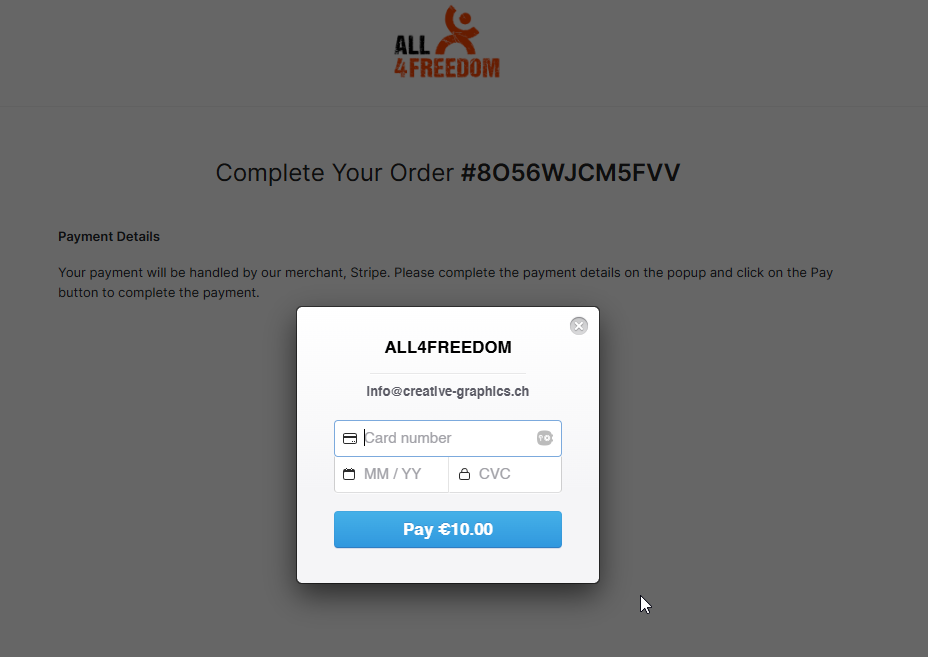
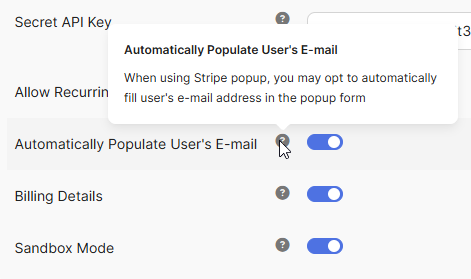
Just activate the "other" Stripe Payment plugin and the data is prefilled.

You are testing with the "wrong" one.

prefill.png

stripe-prefill.png

Regards, Pascal

CreativeGraphics Support

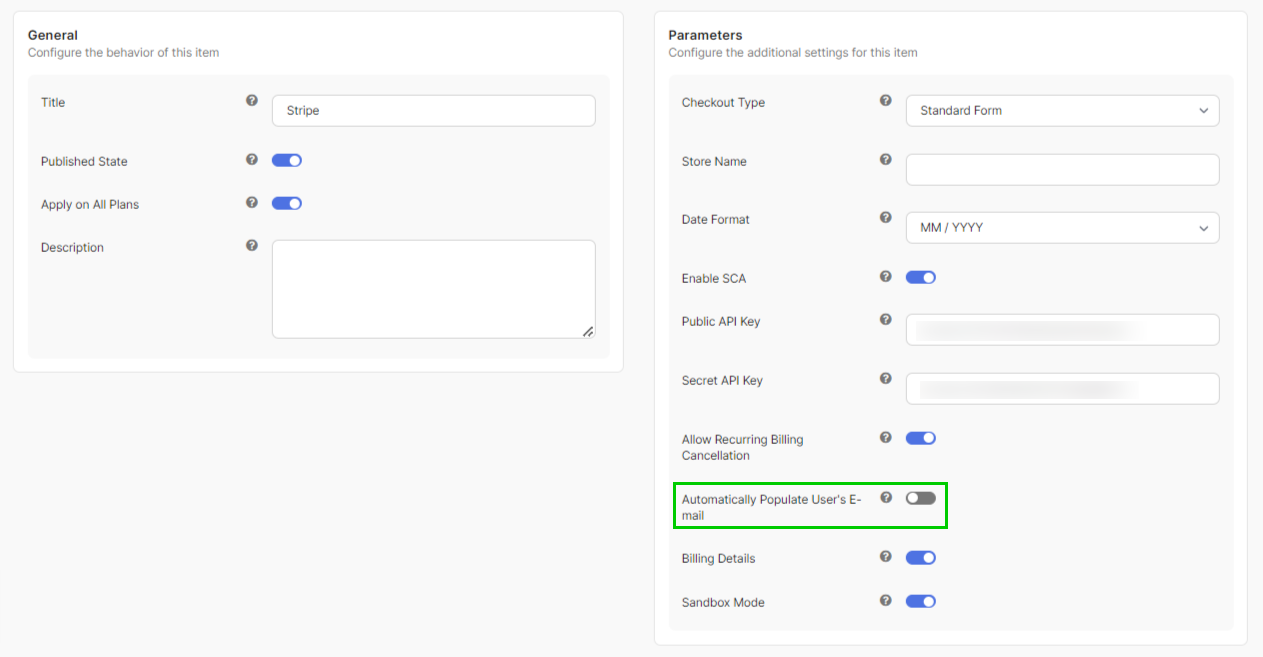
Find the prefill-option in the plugin settings.

settingsstripe.png

Jeroen


OK I understand your reply but using the Stripe Payment Payment Method, I have then all of a sudden lost all the payment options which were setup and only see the card option. Do you happen to know why that is? I am still tryin to find what settings are found where...

screenshot_payment_methods.png

CreativeGraphics Support

We did not change the Stripe Payment plugins.
You are still referring to the Stripe Checkout Plugin (your screenshot).
That never came with an option to prefill user data.

The plugin you use/test: https://creative-graphics.ch/docs/payplans/payment-methods/stripe-checkout

Stripe

The plugin which has a prefill option is that one: https://creative-graphics.ch/docs/payplans/payment-methods/stripe

stripe-again.png

Have a nice day.

Best regards, Pascal

Jeroen

OK I understand when using plugin1, the Stripe Payment Payment Method, the plugin which has a prefill option, it goes directly to the "Complete Your Order #8O56WJCM26CI" and the 'Card Details', which is good on the pre-fill level.

Yet, what is I wish the user to be able to select all the other payment methods I have setup in Stripe and not only see the card option?
On the other plugin2, Stripe Checkout, the user can select different options. 

So it is either prefill logged-in user data and just one card option OR let user choose prefered payment option and let user fill in name and email additionally?

Or is there a way to set the payment options of plugin2 to plugin1


CreativeGraphics Support

To be honest: you don't have a choice to use the Stripe Checkout plugin for legal reasons. 

SCA is a mandatory European legal requirement under the European Commission PSD2 regulation designed to reduce online payment fraud.
https://stripe.com/gb/guides/strong-customer-authentication

Therefore you should use the "normal" Stripe payment plugin and not the Stripe Checkout plugin.

Best regards, Pascal

Jeroen

Ok no problem for me to use the Stripe plugin instead of the Stripe Checkout plugin but how to add other payment options besides the default card ? 


Hope that is still possible in Payplans ...

CreativeGraphics Support

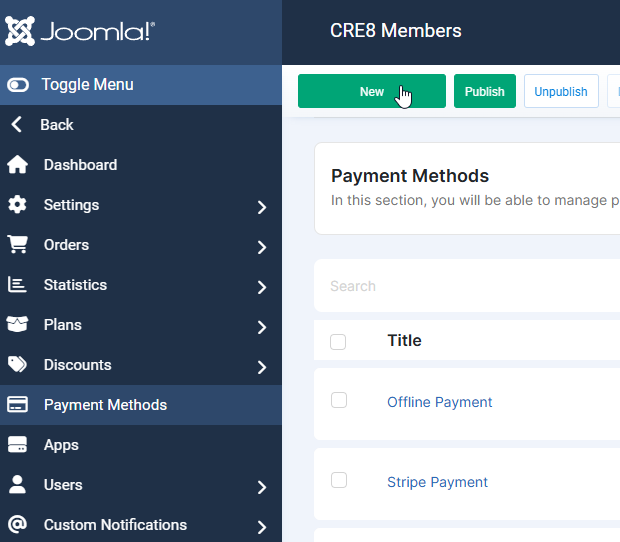
Please refer to the docs here https://creative-graphics.ch/docs/payplans/payment-methods

There are plenty of options and payment providers/plugins shipped with the component.

new-payment-method.png

Regards, Pascal

Jeroen

I have the feeling we are not understanding each other, Let me try again . 


I have configured Stripe as we are using it already in other payment links and methods and it was chosen as Payplans supports it too. 


Within stripe I can select all sorts of way to pay among them Cards, apply and Google Pay,  and wero (formerly the Dutch ideal, which is what we use mostly in the Netherlands)

All this is good and works in the Stripe checkout payment provider of payplans but it does not prefill the name and email address of the logged-in user as a great user experience. 

The other stripe (non-checkout) option does this but then automatically display only credit card fields to filled in rather than the screenshot I posted earlier of how the user can choose his or her preferred way of making the payment from the many options Stripe has to offer and I can enable.  

Now how to have the Stripe checkout prefill or have the other Stripe option display the options displayed by the Stripe checkout? 


CreativeGraphics Support

It's outside our support scope to build a custom tailored solution for this — but we may adapt or extend this as a feature in a future release.

Separately: you'll need to use the Stripe (SCA-compliant) plugin regardless, since SCA is a legal requirement under PSD2, not something we can make optional.

CreativeGraphics Support

To explain: the Stripe plugin handles subscriptions/recurring via its own self-managed rebilling logic, not via Stripes native subscription object. 

Stripe Checkout by contrast hands recurring billing entirely to Stripes own subscriptions. 

So honestly, it is quite an effort to build, it's not just "make an option to prefill user data"!

Jeroen

"It's outside our support scope to build a custom tailored solution for this — but we may adapt or extend this as a feature in a future release."
- Okay wishlist item :-)

"So honestly, it is quite an effort to build, it's not just "make an option to prefill user data"!"
- Okay, thanks for the explaination!

I will switch to the check-out plugin, which apart from the UX hassle of the user having to fill in his or her email address when they are already logged in, does the job as in offering a wide selection of payment options and that has higher prio.

Until we meet again LOL

Jeroen

Quick question: is it possible to configure plans to a certain ACL user group only?
Couldn't find the option but maybe I looked over it?
If is is not possible I will find a work-around - no worries!

CreativeGraphics Support

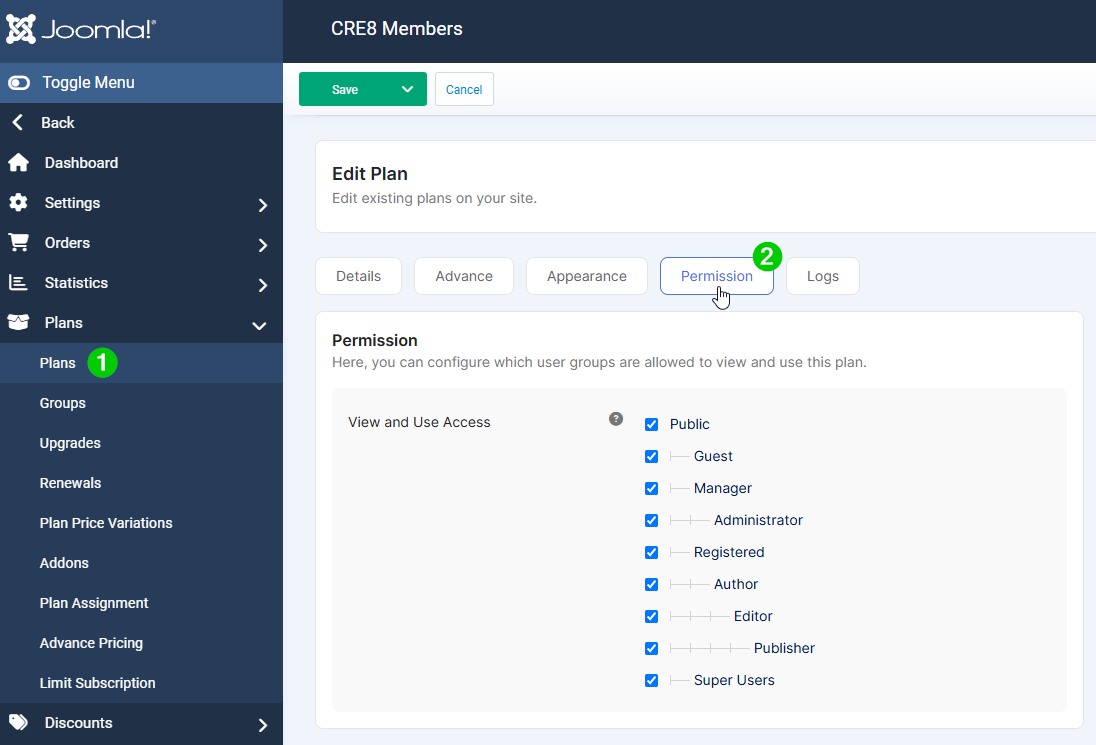
Yeah, head to plans (1), select the plan you like to change and find the view-use access under "Permission" (2).

permission.png

Regards, Pascal

CreativeGraphics Support

Added the email prefill to the Stripe Checkout plugin, version 6.1.1.

Regards, Pascal

Jeroen

Whow that worked nicely for the email field!!!
Any chance that the name field is just as easy to do for you?


Attachments

Screenshot 2026-09-07 at 01-28-12 ALL4FREEDOM sandbox.png

CreativeGraphics Support

That depends on the Stripe payment methods which are not reflected in-linked back to the Stripe Checkout plugin. 

That Name-field is defined by the Stripe checkout page/in their taxonomy and maybe for certain payment methods you can chose, also other fields are mandatory. 

But that is not something we can control, the whole checkout page is generated by Stripe.

The only field we can "propagate/send to that page" is in fact the email-field.
We cannot propagate to the Stripes' Payment method fields.

Best regards, Pascal

CreativeGraphics Support

Further culprit is that the username on our end is maybe a phantasy-name/nickname and doesn't necessarily match the name on the credit card.

Jeroen

Ik, all clear. Closing the Ticket - Thanks 🙏