#376 Stackideas Toolbar menus get 404 error when clicking going back on them once again

Posted in ‘EasySocial’
This is a public ticket

Everybody will be able to see its contents. Do not include usernames, passwords or any other sensitive information.

Latest post by ssnobben on Thursday, 08 October 2026 20:00 UTC

ssnobben

Hi Pascal,

installed new version CRE8 Social 5.1.5 there is some issus with Stackideas Tool bar menus routing you get a 404 erro when clicking on them going back a second time first go a click on some of them and they work and then go back and click second time on some you click before and you got 404 error.

Working for normal menus ie Groups, Pages, Members (People), etc but not for Stackideas Toolbar then you got the 404 error "Page not found".

I clean the social urls etc nothing helps.. Seems Stackideas Toolbars do something with the router there so it now working.

Example Events

This doesnt work coming from Stackideas Toolbar Events ( Members Events/Meetings): --->  https://www.whattodo.com/en/what-to-do-mote-o-events

Example this works main menu Events ( Members events meetings ) : ---->  https://www.whattodo.com/en/videos-groups-blogs/members-events-meetings

Login and start clicking in Stackideas Toolbar going back again to Stackideas Toolbars menus there and then you see the problem you got a 404 error for these menus. See toobar menu below same problem for english and swedish toolbar menu

 

toolbar.png

CreativeGraphics Support

This is inconsistent as https://www.whattodo.com/en/what-to-do-mote-o-events would be a swedish link, not an english one. 

On our testhost (also multilanguage) the association works without any issues.

I will check on your server directly.

ssnobben

ok thks Pascal.. no worry

CreativeGraphics Support

The multilanguage configuration on your site is not working correctly.

The language filter plugin configuration was wrong (autochange language switched to on) and you created 2 menu-items for everything already covered in the toolbar module (not necessary) and additionally 2 un-associated toolbar modules, 1 for every language.

I need some time to unravel that.


CreativeGraphics Support

I found out what happens on your site. 

Look at that: you have two same-language menu-items both mapped to the same view but with different parent menus and different access levels. So when the Social router looks for the "one" canonical menu item for this view, it has two valid candidates and no tiebreaker beyond whatever order MySQL happens to return them in. So it's not something in our code that "picks" wrong, it's the data that gives it two right answers. 

grupper.png

And the same happens for all other entities across your site, for example pages:

pages-huvud.png

I deactivated pages/groups/users duplicated menu items for swedish and english and let the component do its work, and everything checks out (you can reactivate them and see that it will again stop to work then).

You urgently need to revise your menu structure. Like that it cannot work.

There is no error in our code, but your menu-structure/-design messed sef-url generation up by always giving multiple choices for the same. 

Remember, you don't need menu-items at all to load these views in CRE8 Social 😉

Best regards, Pascal

CreativeGraphics Support

Have a look here for example https://young4vintage.ch/community

For 4 languages in total which associate perfectly out of the box and never error 404 I have only 1 single menu-item per language, associated in the other 3.

y4v.png

Nothing more is needed.

Regards, Pascal

CreativeGraphics Support

All the view-/access-rights and the whole rest is defined in the ACL of the Social Component and doesn't need to be re-coverd through separate menu-items/-views in the Joomla menu-structure.

ssnobben

Using Joomla ACL controls to require user registration for viewing content—such as user-generated posts across various topics—is a sophisticated setup. It creates an incentive to sign up, as not all content is accessible without membership. That is why Joomla utilizes hidden menus. So maybe I have to go back to make it all open and if you dont have users it look very empty in the beginning... 


ssnobben

So I have to test a bit more here and come up with a solution that works with Joomla, CRe8 Social and what I want to achieve here.. 😁


ssnobben

Pascal so what I found out is that Stackideas Toolbar pick up the wrong langauge files actually the opposite for each language and therefore create the wrong url for the menus in Stackideas Toolbar when you go back and click on them. 

Example when clicking on Stackideas Toolbar Events in this case for the english toolbar menu it become = https://www.whattodo.com/en/what-to-do-mote-o-events where the end there is for swedish menu url translation ie what-to-do-mote-o-events and if you go to the swedish similar one you got the opposite the english one! ---> ie https://www.whattodo.com/sv/what-to-do-meetings-and-events where the last part of the url is english wrong one for swedish ie what-to-do-meetings-and-events

So this is a bug Pascal and maybe not all the menus is redirected in the wrong language url routing but some of them are unfortunately. And thats why the hidden menus for register/public doesnt work too then...

what you think? 

CreativeGraphics Support

No, I have tested it on your site and it works as soon as you don't assign duplicate menu-items in different sub-menus for the same view in the same language. 

I must say it is an extraordinary setup but as explained, it will generate 2 different sef-urls without any indication on which should be taken when. And as it is not indicated, it falls back to the en-GB.

It has nothing to do with .ini-files being not taken (correctly) into account.

CreativeGraphics Support

I have set it up now on your site. Please test. It works now. 

Problem is really when you assign multiple times the same view to different menus.

ACL is entirely controlled by the component itself. You don't have to do that.
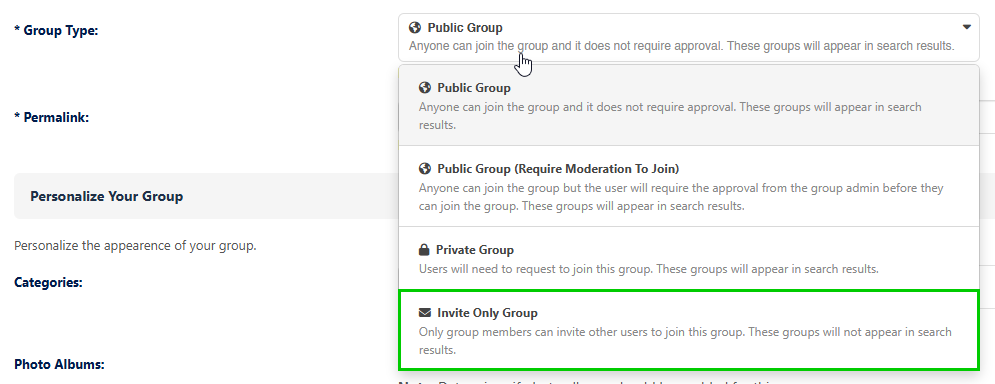
Example: If your users want to create a new group, which is not visible to others, they do it themselves by chosing "Invite only group":

group-acl.png

So you as an admin don't have to create a menu-item for that "All Groups" and then assign it the Access Level "Registered".

You don't have to fine-grain/control that as the Users do a huge part of it by themselves, in using the inbuilt ACL

I hope to have clarified that for you 😊

Best regards, Pascal

CreativeGraphics Support

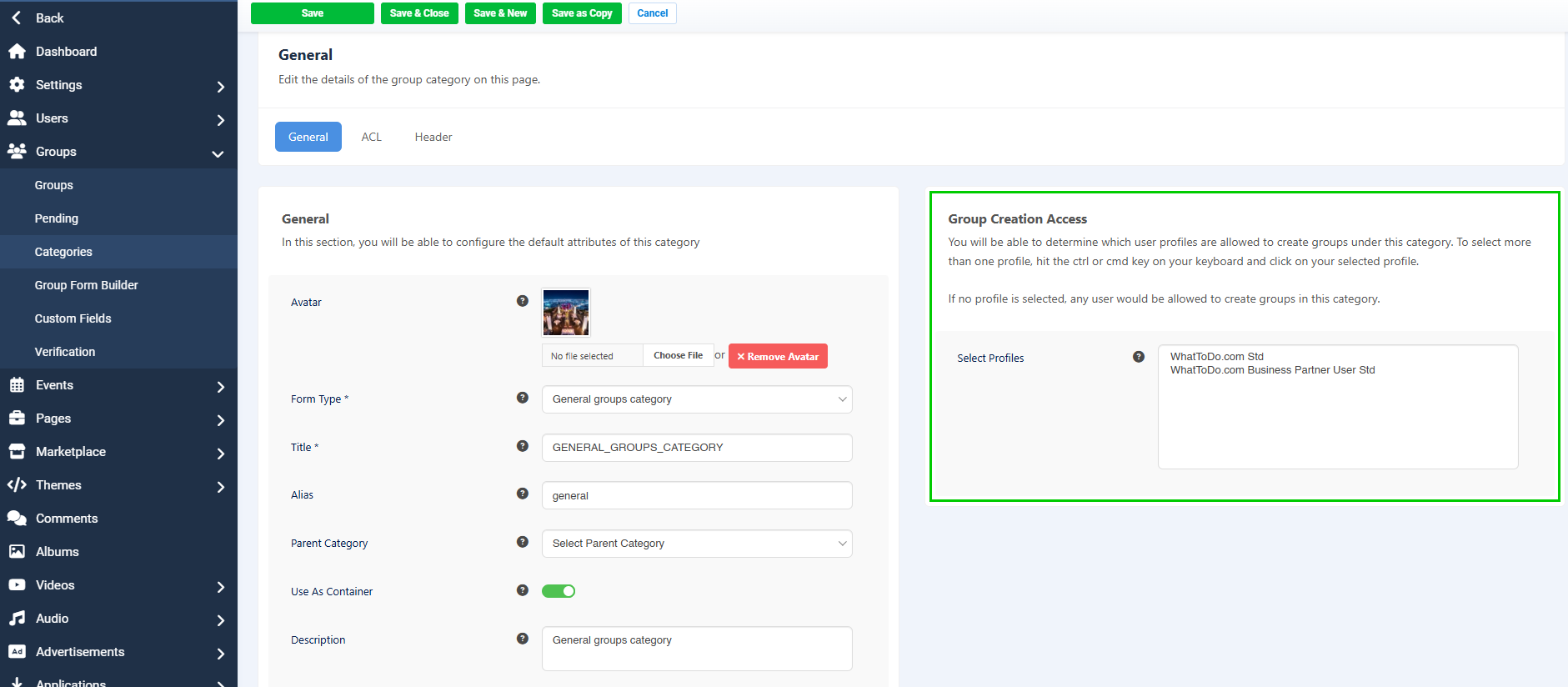
And if you as admin want to restrict group creation access for example for one category, you do that in the group category settings (Group Creation Access): 

group-creation-access.png

You don't need a "Registered" menu item for this purpose.

Regards, Pascal

ssnobben

Hi Pascal,

I have to test this a bit more really bcs this is strange and yes what I want to do is to show certain EasySocial features like videos, pages, ads, groups to public views by Joomla standard menus ( top menu ) but then also have the Stackideas Toolbar restricted for only logged in users Registered. So some of the Stackideas Toolbar menus are restricted to only registered users.

So this worked before but guess not for the latest 2 updates of CRE8 Social maybe.

For example here I test and remove all the Joomla CRE8 Socials Video menus and only have Stackideas Toolbar controling the video menu. All other Joomla menus for CRE8 Social videos is disabled. 

And then this is how Swedish videos url look like when clicking on Videos Stackideas Toolbar for Videos swedish & english ( with all .htaccess etc Joomla correct settings)

1. https://www.whattodo.com/sv/component/easysocial/filmer?Itemid=

2. https://www.whattodo.com/en/what-to-do-videos-eng

The second one is for English language first swedish.

For me its look like some of these Stackideas Toolbars menus are not working correctly in the toolbar itself & also pick up the wrong urls Swedish urls for english sometimes there. Some work correctly and some not. 

FYI. Also when trying to do a language Association for the mod_stackideas_toolbar it only shows English module in the popup to make a assocition to this module. It should show all the Swedish modules there instead of the English ones. *** So this seems to be an important bug there. Maybe this have some effect on this?

CreativeGraphics Support

No, that's not the case. The toolbar module doesn't need an "associated" second module as it covers all installed languages through the 34 lang. toolbar .ini-files. There is no need to have a second instance and to restrict display via Advanced Module Manager to a certain language nor to associate in others.

The languages are handled by the joomla native language filter plugin. If that outputs /sv/ strings from the sv-SE.mod_stackideas_toolbar.ini are taken, if you have /en/ then en-GB.mod_stackideas_toolbar.ini strings are displaying.

CreativeGraphics Support

If you then associate additionally 2 similar views in 2 different menus and with 2 different user levels, the system has too many valid options and no directive to decide which one is adequate. that means you confuse sef-url generation through such a setup, the one hit first will generate, the subsequent will 404.

To be honest: the intended purpose of a social network should be to let your users decide through their sharing-settings whether they want to show a video for everyone or to only share it with their friends. In that sense, your attempt to admin-control the general video view in the menu can contradict user settings. You can restrict video categories and fine-tune ACL there, or give certain users/profiles the ability to publish in a certain cat. or restrict that.

That said, I think the best would be to send me an email and explain in detail how you want this to work. I have the impression that you intend to override users controlling by themselves what they want to share with whom. It is not logical to restrict a public video administratively by setting a menu item to registered when the user decided to share it with everyone 🤔

CreativeGraphics Support

As soon as I have your plan, I will help you to bring it to life. Maybe we just need the id in your setup/urls to make it work or a small tweak. 

Once I clearly understand your intention of that huge menu-setup, I'll be glad to sort it out and try to help you achieve what you want, as long as it doesn't conflict with the user acl or the main component logic.

Have a nice day.

Best regards, Pascal

ssnobben

Ok lets think a bit no worry

ssnobben

Hi Pascal after testing and doing a lot I am sure there is a coding error in Stackideas Toolbar. The toolbar switch english to swedish url and swedish to english urls for same type of Stackideas Toolbar menus there.

See image example you can test by loggin and test swedish/english version of the toolbar menus and then copy them to the other language and it works b u t Stackideas toolbar choose the wrong one(s) there!

"Here work and should be https://www.whattodo.com/sv/what-to-do-foton that is correct Swedish but show the English version instead ie https://www.whattodo.com/sv/what-to-do-photos This is for 80% of these menus there in the Toolbar Pascal so thats the problem --> The Stackideas Toolbar handling the router urls for language translations"

toolbar_error_language_router_urls.jpeg

CreativeGraphics Support

Dear Stephan

I cannot reproduce/see an error here.

When I call https://www.whattodo.com/sv/what-to-do-foton and hit the language-switcher to load EN, it correctly loads https://www.whattodo.com/en/what-to-do-photos

The generated toolbar-links are 100% correct and spot-on.

sv-toolbar-foton.jpeg

Please re-verify, I cannot see an error here.

Best regards, Pascal

ssnobben

Ok Pascal, can you do this and test this.

1. Go to https://www.whattodo.com/sv/what-to-do-foton and login. You will come to the business dashboard first.

2. Click on CRE8 Toolbar menu there "Fotoalbums" and you see it working there coming to --> https://www.whattodo.com/sv/what-to-do-foton .

3. Click on CRE8 Toolbar "Grupper" you will see its also working.

4. Now the problem. Click again on CRe8 Toolbar "Fotoalbums" you got an error 404 black page --> https://www.whattodo.com/sv/what-to-do-photos.

CRE8 Toolbar shows this url instead: https://www.whattodo.com/sv/what-to-do-photos taking the english url part /what-to-do-photos instead of the correct swedish /what-to-do-foton 

**** So CRE8 Toolbar have issues using swedish urls and take the english ones instead and vice versa also for english/swedish. if you do a lot of testing here with english/swedish and swedish/english toolbar menus clicking! 

If CRE8 Toolbar could use the correct langauge version it works! So this is an issue with CRE8 Toolbar router. CRE8 Toolbar pickup the wrong langauges urls to the Toolbar menus.

Whats interesting is i f you click on the CRE8 Toolbar home icon first all other menus you click on then working :)

ssnobben

Hi Pascal did you test this and see it pick up the english version for swedish url and for swedish version it pick up the english url there if you do some different clicking on Toolbar menus after login. So the Toolbar can handled different language urls there correctly. It take the wrong ones after reloading..

CreativeGraphics Support

Hi Stephan

Thanks for the precise steps, they helped us reproduce it.

It was a bug in CRE8 Social's router: on the Groups, Pages, Events and Marketplace pages it could mix up the Swedish and English menu items for the toolbar links.
It's fixed on whattodo.com now and will be part of the next release.

And I have reconfigured your language filter system plugin, as "Automatic Language Change" was set to active.

deactivate-lang-switch.jpeg

Please clear your browser cache and test again.

Separately, I'd still recommend removing the duplicate Guest/Public menu items per view and language, as discussed before.

Best regards, Pascal

ssnobben

Hi Pascal glad that you also find out this problem. So working now but now only one last issue there with the CRE8 Social Toolbar.

Pls login front English version from start and click on Toolbars "Videos" menu. You get a permission error there:

"You don't have permission to access this. Please contact a website administrator if this is incorrect."

You can go to swedish then and click on Videos Toolbar menu it works. If you click on the language icon flag on site for English it works then also so the associations works.

But if you go back and click on Toolbars Icon and then click on videos you have the same error message again. So only this Toolbar menu have this issue now ----> "Videos"

CreativeGraphics Support

I have corrected the Access Level for the members videos on your site. It was set to "Guest" instead of to "Registered".

Best regards, Pascal

ssnobben

Hi Pascal after long time I found the issue bcs I could create a new menu and deleted the old All videos menu for the hidden menus I have and are public. I change back the front end menu to Gues and now all works as I want it to be so closing this finally :)


Thks for cooperation to fix this now it works great!

We use cookies
We use cookies on our website. Some of them are essential for the operation of the site, while others help us to improve this site and the user experience. You can decide whether you want to allow cookies or not. Please note that if you reject them, you may not be able to use all the functionalities of the site.