Updates
The update procedure

Step 1
Login to your user account.
In the main menu hover over "My account" and click on "Download-IDs".


Step 2
Generate your Download-IDs
Chose how many Download-IDs should be generated and click on "Process".
ONE Download-ID is valid for ONE website.
We don't collect any data on how many times our software is installed nor on which domains it is used.

Step 3
Copy the Download-ID
Copy the Download-ID you generated in step 2.
Step 4
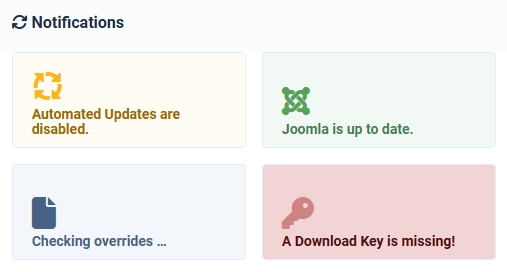
Find the missing Download key notification
On the site you installed our software, find the notification "A Download Key is missing" in the admin backend (image 1). Alternatively click on System / Updates / Update sources and find the correct entry.
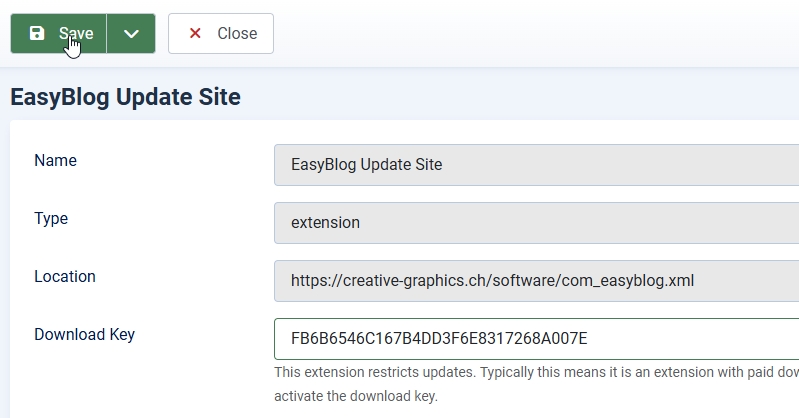
Click on the source and paste the copied Download-ID in the empty field (image 2). Click on "Save" or on "Save & Close" to store the key.
That's it! 🚀
Now you're all set and everything is ready to update via the regular built-in Joomla updater. We always deliver a full installer which contains the component, modules, plugins and libraries. There is only ONE update source for each of our adapted components in which our update procedure has been implemented. All obsolete update sources for that component will be removed automatically. Additional languages can be found on the components sites (under software) or on our translation platform.
