Bunny CDN Stream Integration
For those who do not have the option of using a dedicated server and whose hosters prevent the use of ffmpeg on shared hosts for resource reasons, we have integrated Bunny CDN Stream into EasySocial.
Requirements, configuration

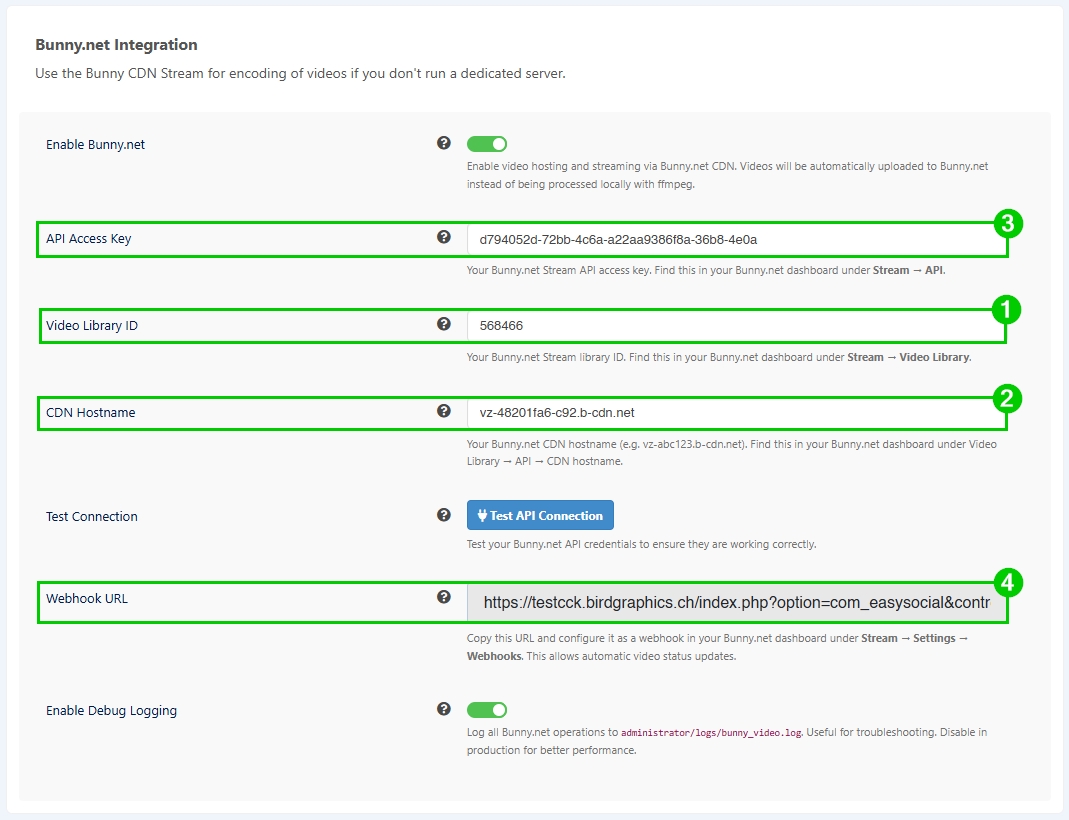
Clicking on the ‘Test API Connection’ button shows whether the connection to the Bunny CDN interface can be established successfully.
The ‘Enable Debug Logging’ option collects all status messages and processing steps in a single log file. This is located in the [ROOT]/administrator/logs/ directory and is called ‘bunny_video.log’. In productive environment, logging should be disabled to prevent performance issues. This option is for troubleshooting purposes only.
IMPORTANT
The Video Library ID, API Access Key and CDN Hostname are generated by Bunny CDN and must be entered into the EasySocial configuration. The Webhook URL is generated in EasySocial and must be entered into Bunny CDN.
If Bunny CDN is used, please ensure that nothing is entered in the ES configuration under ‘Path to FFMpeg’.



The following options have been added for the Bunny Player AND for the integrated player (video.js): Autoplay, Autoplay when in Viewport, Autoplay Muted, Loop Videos. Depending on the browser, autoplay only works if the videos are muted.


This check may reveal videos on your website that have not been successfully encoded. These will have the status ‘pending’. The reasons for videos not being processed successfully may be faulty or corrupted source files, incorrect or unsupported formats (Bunny CDN and own server/site, please check in Media → Permitted file types) or videos that were actually processed successfully but for which no/a significantly delayed response (webhook) was sent to your server.
Improved display, further details
Portrait mode videos are no longer displayed at 100% of the width in the stream on wide viewports (laptops and larger), but only at 33.333%, while the height is displayed at 100%.
Thumbnails generated by Bunny CDN are automatically retrieved and stored locally.
To adjust the border-radius setting of your videos, simply change the default value to meet your needs using the following selectors:
#es .es-video-content-body .video-container.is-portrait,
#es .es-video-content-body .video-container.is-portrait .es-video-player,
#es .es-video-content-body .video-container.is-portrait .es-viewport,
#es .es-video-content-body .video-container.is-portrait video
 {
    border-radius: 6px; // Adjust to meet your needs
    overflow: hidden;
}
IMPORTANT
To improve workflow and keep things as simple as possible, file handling is fully integrated. Deleting the video from your own website also deletes the corresponding video from the Bunny CDN library.
The advanced video options are available from version 1.4.3 of EasySocial.
